Olist Brazilian E-Commerce Analytics
Connecting ecommerce data with Power Query, MySQL and Power BI to explore revenue, fulfilment and customer sentiment.
Dataset
Olist (Kaggle)
Records
100,000+ orders
Period
2016 to 2018
Tools
Power Query, MySQL, Power BI
The question
I used the Olist ecommerce dataset to explore revenue, delivery performance and customer reviews together. This is an independent portfolio project using public data. It does not describe work commissioned by Olist or changes to its internal reporting.
From separate files to an analytical model
I prepared the source CSVs in Power Query, used MySQL for analysis and connected the results to Power BI. The project notes describe standardising location text, translating product categories, preparing delivery fields and deduplicating reviews.
The combined fact table contains approximately 112,000 product lines. This is different from the number of orders: a single order can contain more than one item. Order counts and order level rates need to account for that distinction.
The executive view
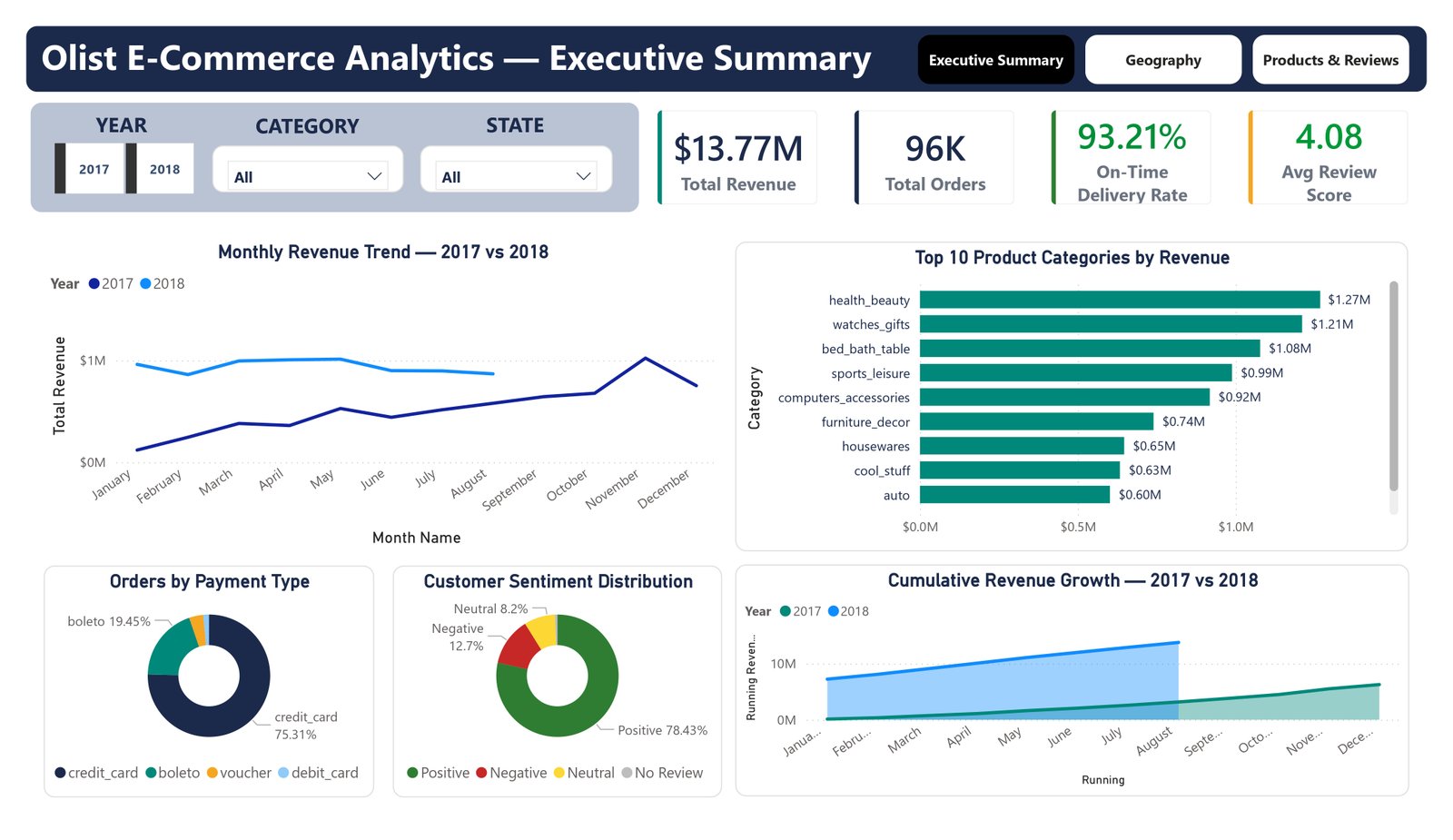
The existing dashboard displays revenue, total orders, delivery performance and review scores. It also includes monthly trends, category revenue, payment types and sentiment distribution. This gives the reader a starting point for exploring how commercial performance and fulfilment relate.
The analysis behind the report
The original implementation uses MySQL queries for revenue trends, delivery comparisons and sentiment analysis. It also uses views as report sources and DAX for time based measures. A view provides a consistent query interface; report refresh still needs its own configuration.
Delivery differences between states are worth investigating alongside review scores. I would treat this as an association to explore, not proof that delivery alone caused dissatisfaction.
Checks that matter
- Order grain. Count distinct orders where the question concerns orders, rather than counting product lines.
- Payments. Reconcile the handling of multiple payment records before treating the total as revenue. Selecting a primary payment can exclude valid amounts.
- Time coverage. The displayed 2018 monthly series ends in August. Comparisons should use equivalent periods.
- Sample size. Interpret small categories and state groups alongside their record counts.
What I take from this project
The most useful part is the connection between the data model and the business question. A report needs more than attractive KPIs. It needs definitions that explain what each number includes and excludes.
The dashboard image shows one report state. The interpretation depends on the measure definitions and filters described above. These findings are exploratory and do not establish a causal explanation for customer sentiment.
Visit my GitHub profile ↗